CS2 Nuke utility: a simple outside protocol
Give every smoke a job, every player a role and every missed throw a recovery call.

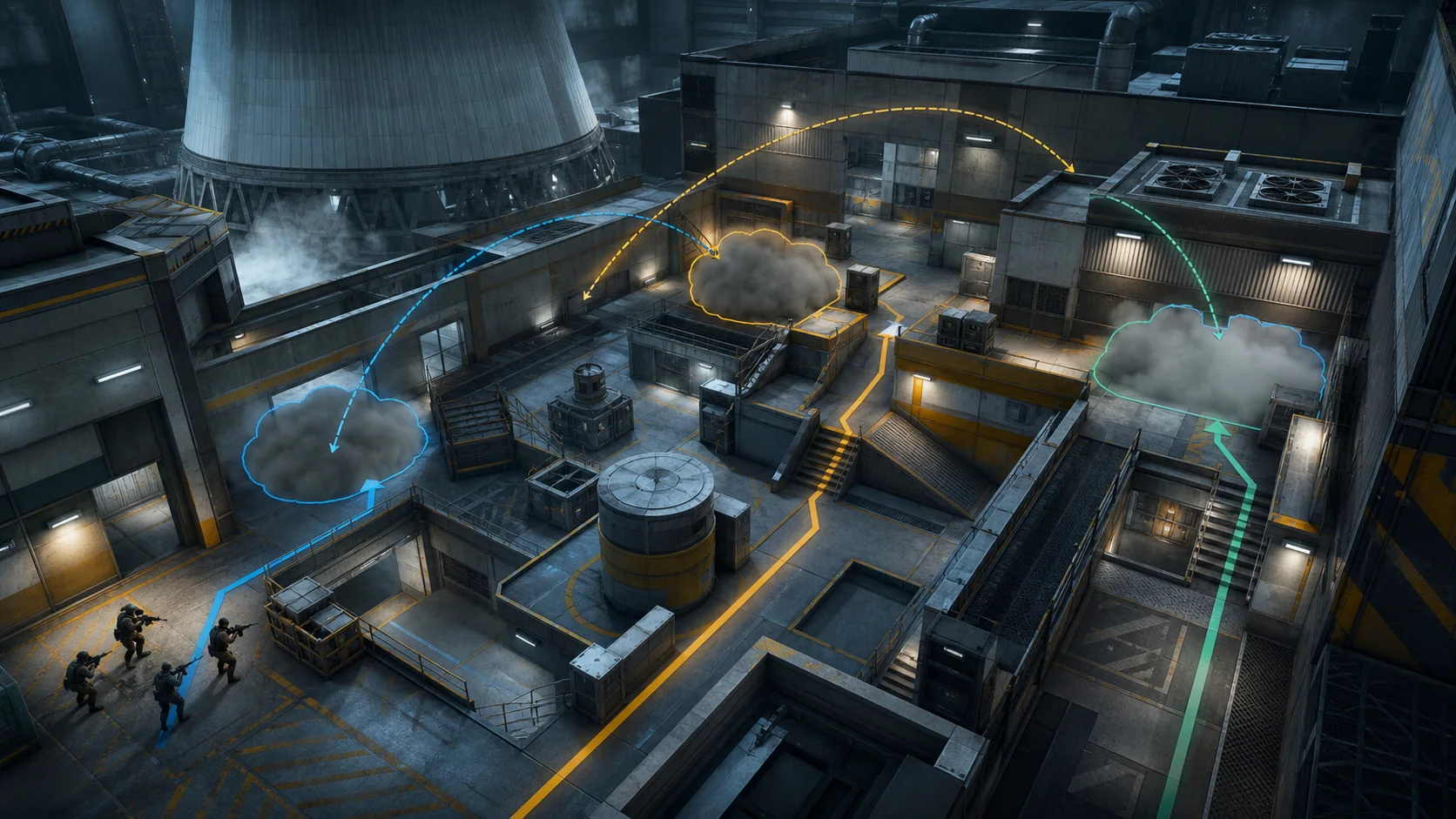
This CS2 Nuke utility guide gives a five-player team one outside protocol instead of a folder of disconnected lineups. You will learn the purpose of each smoke, the spacing that keeps the throwers safe and the fallback call when a grenade misses.
Utility needs a job
A lineup is only useful when everyone understands what it removes. The outside trio should deny the most dangerous long sightlines, create a protected crossing window and force defenders to reveal whether they will contest. If a smoke does none of those things, it is expensive scenery.
Name throws by function rather than by creator. “Cross,” “deep” and “garage gap” travel better through a roster than references to a clip everyone watched once.
Assign three roles
- Lead thrower: starts the sequence and confirms the first bloom.
- Second thrower: completes the protected lane and watches for a fast push.
- Lane player: moves on the timing, checks the nearest gap and reports visibility.
The remaining two players protect lobby and punish rotations. Nobody should be staring at the sky while an opponent can walk through an unlocked door.
Use a visible confirmation
The lead thrower calls “set” only after seeing the first smoke begin to bloom. The second throw follows on that cue, not on a memorised count from spawn. Small movement and server differences can shift a rehearsed rhythm; visual confirmation makes the protocol more robust.
The lane player answers with one of three calls: clean, gap or contest. That single word tells the team whether to cross, repair with a spare smoke or turn the utility into pressure while keeping the bomb elsewhere.
When a smoke misses
Do not improvise five different repairs. If the dangerous sightline remains open, the nearest player uses the spare smoke and the team delays. If only the far edge is exposed, the lane player can hold the gap while one teammate crosses. If both lanes fail, cancel the route and use the utility as a fake.
A failed throw is information about the protocol. Record the spawn, movement and aim point after the round. Fix it in practice, not during the next buy timer.
Add one flash, not three
A single flash timed as the crossing player reaches the first danger point is often enough. Extra flashes can blind the player meant to exploit the smoke or advertise the exact second of the move. Preserve one for the lower-site entry or the retreat.
Practise the sequence with an opponent holding different outside positions. The exercise is complete only when the lane player can identify what remains visible through each variation.
A ten-round server drill
Run five clean attempts from common spawns, then five with a forced error: late smoke, visible gap, early defender pressure or dropped bomb. Rotate roles every two rounds. Success means the team reaches the next decision with at least one piece of utility and a shared call.
Valve’s update cadence can change geometry and grenade behaviour, so verify lineups after map updates. Pair this protocol with our angle discipline routine and short comms framework.
Common outside mistakes
The most damaging error is crossing before the smoke wall exists. The second is throwing from an exposed position while teammates assume the route is protected. The third is treating silence as success: a defender can wait behind the wall and punish the second player.
Require the lane player to clear the nearest contact point and report it. The smoke removes a sightline, not the opponent. Once the team understands that distinction, the same utility becomes safer without adding another grenade.
Turn the protocol into a fake
A good outside sequence threatens more than one destination. If defenders over-rotate, keep the bomb in lobby and use the crossing player as noise. If nobody responds, complete the route with the support player close enough to trade.
The fake works because the opening utility looks identical. Do not add dramatic extra grenades that announce a special round. Preserve the same timing and change the bomb’s commitment after the information call.
Review utility as a team
Watch the round from the lead thrower’s perspective, then from the lane player’s perspective. The thrower sees execution; the lane player sees whether the protection arrived in time. Comparing both removes arguments based on incomplete views.
Record only one correction for the next practice: a safer starting position, a later cue or a clearer gap call. Team utility improves through shared timing, not through one player collecting more lineups.
Before you queue
Confirm every lineup once after a map update and then practise the movement between throws. A perfect smoke delivered three seconds late can be less useful than a simpler throw that arrives with the team.
Assign the spare grenade before the round begins. When a gap appears, the team should know who repairs it and who keeps watching the push. That preparation prevents three players from reaching for utility at once. After the match, save one successful attempt and one failed attempt, compare bloom timing with the crossing player’s position and adjust the cue rather than asking everyone to guess faster.
Sources and update note
Official Counter-Strike 2 update notes
This article was manually reviewed on July 27, 2026. Generated editorial artwork is credited to Kaizensclan.
Editorial note
- Official update notes and Kaizensclan editorial testing
This article was reviewed on July 27, 2026.

Related stories
Path of Exile 2 Sorceress leveling guide for 0.5.4e
Path of Exile 2 Sorceress leveling is smoother when the character solves one damage loop before collecting every elemental skill. Patch 0.5.4e is the referenc.
Minecraft mace combat guide for Java 1.21.9
Minecraft mace combat turns vertical movement into damage. Java Edition 1.21.9 is the reference version. A smash attack requires striking while falling far.
Dota 2 Watcher control guide for patch 7.41e
Dota 2 Watcher control is useful when it protects the next movement, not when a support activates every structure on cooldown. Patch 7.41e is the reference.
Community channel
Join the discussion
Start a thoughtful, specific conversation about this story.
Verified readers only
Continue with Google to comment.
Your Google account creates a reader-only Kaizensclan profile. Your first comment is reviewed before publication.